Discuss your app idea
Fitness app · Android / iOS via TestFlightExplore the screens

Own product · Internationally launched

Each set captured.
Progress in pictures.

A training log for the moment between sets. Record weights and reps, view your muscle groups and look back on your workouts. Even without range.
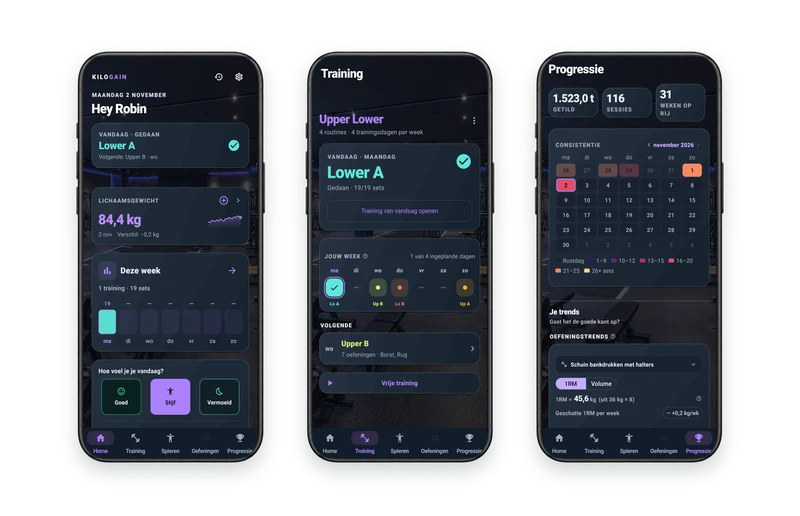
Launched through app stores in Europe, the United States and Canada.

  • Flutter App
  • Local first
  • Google Play
  • TestFlight for iPhone
  • Apple Watch and Wear OS
Kilogain

The challenge

Training requires focus.

You want to quickly write something down between sets. Your registration may not depend on the range in the gym.

With the app

Capture. Looking back. To proceed.

Sets are stored on the device. The muscle map and progression overviews provide insight into your training data.

This is how it works in practice

Four steps. One clear application.

Select a step and view the corresponding app screen, with fictional demo data.
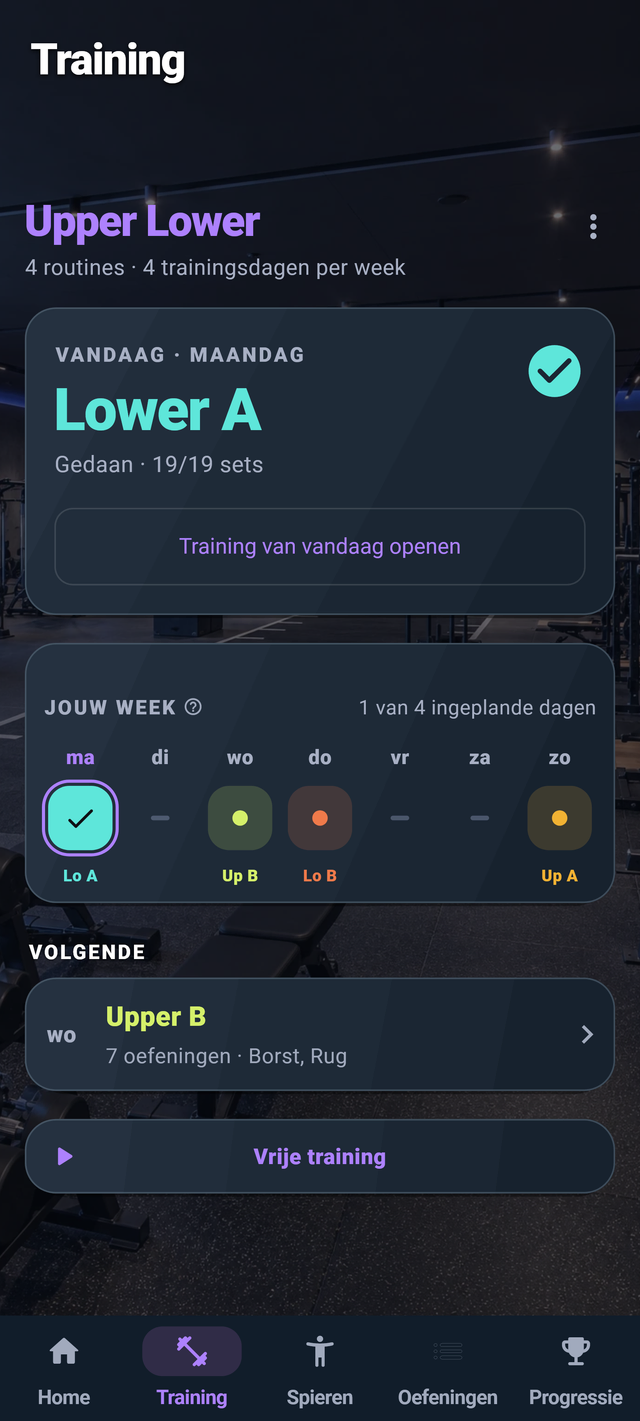
Training plan · choose your workout

What does this mean for a business app?

The same design choice helps on a jobsite or on the road: record locally first, and update online when the connection is restored. We discuss the options per application.

Kilogain Wear · Apple Watch and Wear OS

Your training.
On your wrist.

Leave your phone aside for a while between sets. View the active exercise, adjust weight and reps, and track your rest time on your watch.

The watch app works with Kilogain on your paired phone. Start and finish your workout on the phone.

During your set

View your active exercise and complete a set. You can undo a wrong tap.

Apple Watch
Wear OS

Localized Apple Watch presentation views and Wear OS app screens with fictional workout data.

Phone and watch, one workout.

Pair your Apple Watch with your iPhone, or use a Wear OS watch with Android. Enable watch pairing in Kilogain settings on your phone. Apple Watch requires watchOS 10 or newer.

Choose Dark, Light or Black Gold on your watch, too.

Discover Kilogain Wear ↗

Try it yourself

Apple Watch is available through TestFlight, along with the iPhone app. Wear OS is available via Google Play, along with the Android app.

All functions & technical choices 77 functions in 10 parts
Training

Log a workout, as quickly as possible.

  • Home screen: a Today card with your routine and a start button, a quick weigh-in and Last Trained.
  • Your week: the training screen shows the whole week; tap a day to start the routine, switch it up, or make it a rest day.
  • To complete sets: the weight is already ready with your last time; completing reps books the set. Large input windows with minus and plus.
  • Enter faster: with Next and 'Same as previous', and a check mark per set.
  • Previous time: each set shows what you did in the previous session.
  • Set types: Mark a set as a warm-up set, drop set, or to failure. A dropset is given steps; warm-up sets do not count.
  • Warm-up Calculator: a sample schedule based on your working weight, which you adjust yourself. The weights are rounded to what you can load.
  • Weight per exercise: per dumbbell, per side, extra weight on top of your body weight, or the level of a band.
  • Timed exercises: a stopwatch for a plank and the like.
  • RIR (optional): after each set indicate how many repetitions you had left in reserve, from 0 to 4+. Default off.
  • Rest timer: starts automatically after a working set, with +30 s and skip. The rest applies per set and the app can remember them.
  • Rest timer on the lock screen: on Android a continuous notification with the countdown, the exercise and the next set, with +30 s and skip, even when the screen is locked.
  • Supersets: two, three or four exercises in turn, on one card per round, with rest only after the round. To be added to every routine and every workout.
  • Disk calculator: long press on the weight shows which discs you place on the bar per side, in kg or lbs.
  • Replace or move: change an exercise or change position during training.
  • Notes: for an exercise, a set or the entire training. A note for an exercise remains with it every time.
  • Remove set: wipe away, with undo.
  • Training in progress: a bar on the other tabs takes you back to your training, including the duration.
  • Pause and resume: close a training without completing it and continue later.
  • Empty training: Start without a routine and add exercises yourself.
  • Post-training report: duration, sets, volume, your heaviest set, the most trained muscle and the difference from last time.
  • Share card: After training, in history or in a record, share a summary as an image, portrait or square, with the duration, sets, total and muscles trained on a body map. You can hide weights. In Dark or Light, and Later Premium in Black Gold.
  • Rewards: confetti for a new record or milestone.
Schematics

From first schedule to fixed week.

  • Multiple schedules: your first schedule is free; Later Premium create or copy a second schedule. You can always change and rename.
  • Schedule Assistant: choose your training days and then create a sample schedule (Full Body 3× or Upper / Lower 4×), a split (push-pull-legs, upper/lower, full body, bro-split, Arnold split) or put together your own, with a superset per day if you want.
  • Per training day: exercises, sets, a name and a color; at the end a body map shows which muscles the diagram touches.
  • Weekly schedule: routines on fixed weekdays, or simply in order: always the following routine.
  • Routine editor: drag and drop exercises, per exercise sets, a rep target and rest, and create or cancel supersets.
  • Exercise Selector: search and filter, and immediately create a new exercise if it does not already exist.
Muscles

Your body is the graph.

  • Body Map: rotates between front and back and colors per muscle according to this week's sets versus the target; a male or female figure.
  • Sets per muscle: twelve muscle groups, each with your sets opposite your target. Purple below the goal, orange close by, green when it has been achieved. You will see how many muscles are on target and which received the least.
  • Fair count: a working set counts 1 for the main muscle and ½ for an accessory muscle; warm-up sets do not count. Would you rather just use the main muscle? That's one switch.
  • Detail per muscle: which exercises contributed and how many sets.
  • Four-week average: Later Premium next to the current week.
  • Own set goal per muscle: Later Premium from 1 to 20 sets per week.
  • Planned sets: Later Premium next to your goal you will see how many sets your schedule plans per week, on the card and as a list.
  • Last trained: on the home screen per muscle just loaded, recently or longer ago, with the sets of that day. Tap a muscle for this week's sets versus your goal and the final times each day. A fixed calculation rule, no measurement of your recovery.
Exercises

273 exercises with drawing.

  • Library: 273 exercises, each with a moving drawing and the muscles they train.
  • Search and filter: by name, muscle or material; by pattern (push, pull, knee, hip, trunk); composite or insulation; twelve muscles and ten types of equipment, including barbell, dumbbell, cable, machine, kettlebell, EZ bar and Smith machine.
  • My exercises: your own list of the exercises you actually do.
  • Detail: the animation, a body map with main and accessory muscles, and your 1RM.
  • Own exercises: name, muscles, material, movement pattern, compound or not, per side, and by time or by repetitions; can be edited or archived afterwards, so that your sets are preserved.
  • Merge: merge self-typed exercises with the library, with suggestions by name; the sets move along.
Progress

Seeing yourself getting stronger.

  • Key figures: tons lifted, number of sessions and your streak in weeks.
  • Consistency calendar: per month, colored every day by the number of sets.
  • Strength Trend: per exercise the estimated 1RM or volume per week over 12 weeks, with a trend line. The current week does not count yet. Read values ​​by dragging.
  • Volume per muscle: Later Premium kilos per week over 12 weeks, per muscle.
  • Floor: Later Premium balance between pushing, pulling, knee, hip and torso; whether you are getting stronger (relapse, stable or progress); and where your reps fall.
  • Records: the heaviest set per exercise with a record staircase, sortable by newest (default), name or heaviest.
  • Milestones: 16 badges in four series: sessions, weeks in a row, tons and records.
  • 1RM card: your maximum from the best set of the last 12 weeks, with the weights for 1 to 15 repetitions.
  • 1RM calculator: Enter weight and reps to estimate your maximum.
Body

More than kilos on the bar.

  • Weight: a weighting on the date you choose, a target weight, the trend per week, a graph with target line and the history per month; delete with undo.
  • Body Measurements: Later Premium chest, waist, hips, arm and thigh (left and right) and neck, with the gradient.
  • Progress photos: Later Premium from the camera or gallery, in a grid with the date; they remain on the device and are never synced.
  • Compare photos: Later Premium two photos side by side or with a scroll bar.
History

Find everything.

  • Calendar: per month, with a dot in the color of the routine and a list of workouts with sets and volume.
  • Daily log: every training as a reading sheet, with weights, repetitions and RIR.
  • Retrofitting: move or change a training to another date; delete with undo.
Details and account

Your data, everywhere.

  • Offline first: everything is in a database on the device.
  • Log in with Google: the session is stored securely on the device.
  • Backup and Sync: with one button or automatically, a few seconds after a change, with the time of the last time and a clear message if it fails.
  • Health data: weight and measurements are only sent to the server with your express permission.
  • Delete account: on the server, and if desired also on the device.
  • Delete device: erase everything on this device, with the option to also delete the account.
  • Export: sets, weight, measurements, settings, goals, routines and weekly schedule in one CSV file.
  • Import: your own export, a backup of the old Kilogain web app or a CSV from another training app, with an overview in advance. Trainings that are already there will be skipped.
Settings and display

Tailored to your needs.

  • 25 languages: to choose yourself, or the language of the telephone.
  • Themes: Dark (deep night blue) and Light (soft mist blue), and Later Premium Black Gold: black and gold, with a gold app icon.
  • Units: kilo or pound and cm or inch, separately. Asked at first start, pre-populated according to your region.
  • Rest times: one standard rest period, from 15 seconds to 10 minutes. It can be different per set or per exercise in your routine.
  • Personal: RIR on or off, the body figure and your name in the greeting.
  • Explanation buttons: a question mark next to each calculation that explains how it works.
  • Feedback: send a message from the app, without training data.
Smart watch6
  • Active training: View the current exercise and your progress during the workout.
  • Weight and reps: Adjust the values ​​for your set directly on the watch.
  • Track sets: Complete a set or undo an accidental registration.
  • Rest timer: Review your remaining rest and continue with the next set.
  • Training overview: View your exercises and completed sets on your watch.
  • Three themes: Choose Dark, Light or Black Gold on the watch, regardless of the phone theme.
State of affairs

Honest: what is there today and what is not yet.

  • Available on Android: via Google Play as an open test. The iPhone version is available at TestFlight.
  • Free during the open test: a Premium subscription via Google Play and the App Store is built-in but is disabled. What you already use remains usable.
  • Smart watch: Wear OS is available via Google Play and Apple Watch via TestFlight. The watch app works with the paired phone.
{ three themes }

Your preference. More insight with Premium.

Dark and Light are part of the free basics. Black Gold and additional insights, such as long-term trends and monthly reports, are provided for Premium. During the open test, the Premium features are freely available; a paid subscription is not yet active.

Kilogain in Dark, Black Gold and Light
{ for your company }

What a training app says about your business app

A business app is based on the same building blocks as Kilogain.

One login per user

Each user has their own account, safely stored on the device.

Security per row

In the database, everyone only sees their own data. The database itself takes care of this, not just the app.

Local first, then update

The app does not falter in poor reception: on a construction site, in a basement or on the road.
Technology & use

Under the hood

The key choices behind this app and what they mean in everyday use.

Android and iPhone

Built with Flutter for Android and iOS. The iPhone version can be tried through TestFlight.

Train without internet

Workouts and records remain available on your device when reception is poor.

Backup and synchronisation

An account allows data to be synchronised. Your workout starts on your device.

Choose when to sign in

Start training and connect an account later.

Rest timer and notifications

The rest timer helps between sets. Notifications support use while the app is in the background.

Three themes

Choose Dark, Light or Black Gold. The same functions stay in their usual place.

Explore the screens

Explore the application screens in their device mockups, with an explanation of each function.

Explore the screens
For your organisation

An app for a daily routine?

From a training log to a focused registration tool: discuss which tasks your users want to simplify.

Discuss your app idea
Next projectAequilibriumTime tracking for a riding school