Discuss your app idea
Time tracking app · Android / PWAExplore the screens

Client project · Time-tracking app

Every working day counts.
Screened every hour.

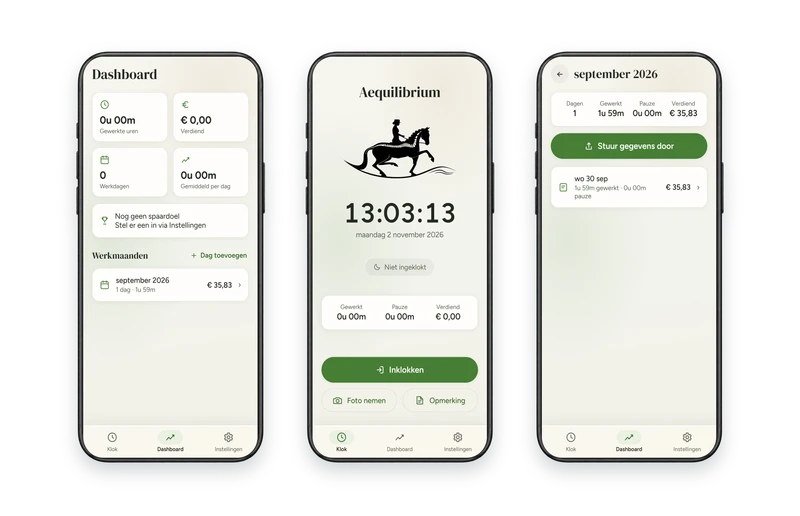
A private hours app for the employees of the Aequilibrium riding school. Clock in on your mobile phone, keep track of breaks and share a monthly report with the manager. Register even without coverage.
  • Web app
  • Offline registration
  • PDF report
Aequilibrium

The challenge

Every working day counts.

Hours worked, breaks and additions must be recorded correctly. The manager needs a clear monthly overview.

With the app

From clock to monthly report.

The employee registers on the mobile phone and creates a PDF from that data to forward.

This is how it works in practice

Four steps. One clear application.

Select a step and view the corresponding app screen, with fictional demo data.
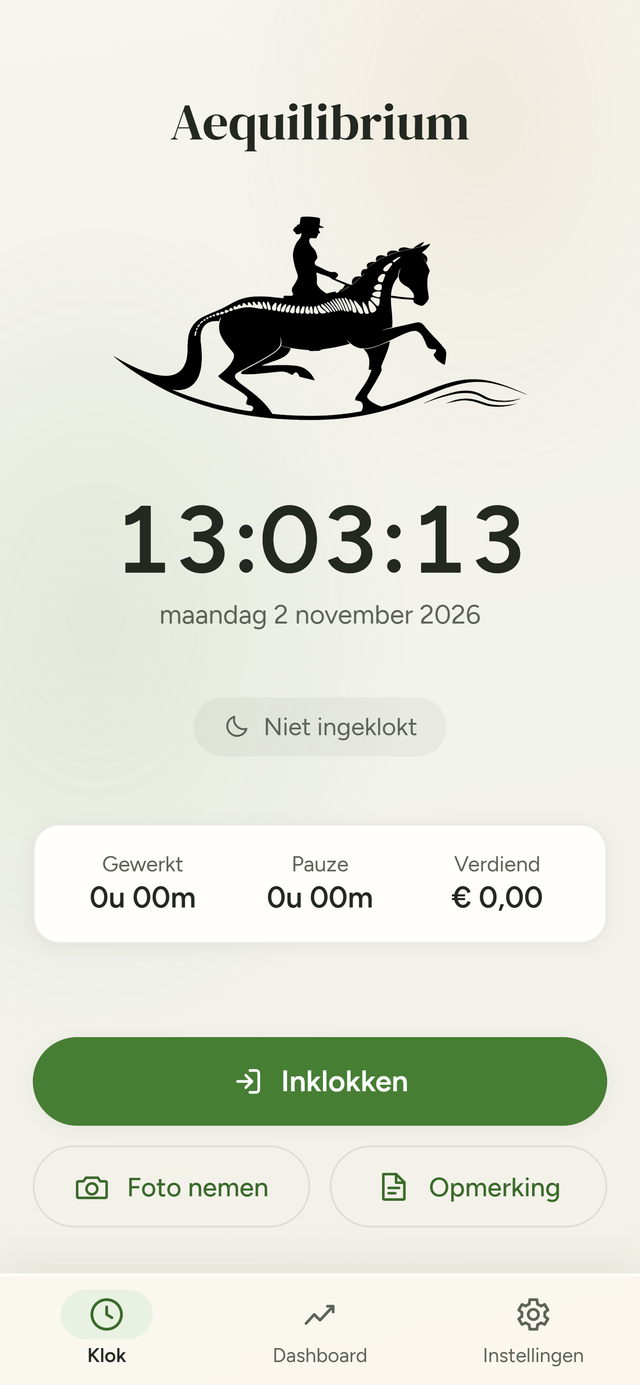
Clock screen · start of the working day

Why register on the device?

Reach is not always self-evident at a riding school. Hours remain available locally. The monthly report is shared by the employee.

All functions & technical choices 43 functions in 9 parts
Clocks

The clock screen: what an employee uses every working day.

  • Clock screen: a running clock, the date, the status and the logo of the riding school.
  • One-tap clock-in: or first choose the type of work you are clocking for, including the rate.
  • Pause and resume: breaks are unpaid and are recorded separately; Resume continues the same work.
  • Clock out: ends the working day, with a confirmation during work.
  • Other work: switch to a different type of work and rate without clocking out.
  • Today's totals: worked, took a break and earned.
  • Late shifts: a service after midnight remains on the day it started.
  • Photo or comment about today: directly from the clock screen.
Edit working days

Correct mistakes and complete forgotten days.

  • Day detail: all blocks of a day with from–to, type of work and duration, and a daily total.
  • Adjust block: change the start and end time and the type of work.
  • Add or remove block: add a forgotten piece of work or a break, or delete a block after a confirmation.
  • Enter the day afterwards: date, start, end and pause in one form; the break comes naturally in the middle of the day.
  • Delete full day: the hours, comment and photos of that day, after confirmation.
  • Night work: an end time before the start counts as the next morning.
Wages and earnings

What a working day yields, correct per block.

  • Hourly wage: to be set per employee.
  • Work types with their own rates: each type of work a name and a rate, to add, modify and delete.
  • Rates remain correct: name and rate are on each clocked block; a new rate does not change old hours.
  • Merits: rate times the time worked; breaks do not count.
  • Savings goal: a name and an amount with a progress bar; Once the goal has been achieved, you can start a new one with one button.
Overviews

From one day to all months.

  • Dashboard: hours worked, earned, working days and the average per day of this month.
  • Working months: each month with the number of days, hours and amount, newest first.
  • Monthly overview: the totals for the month and each day separately, with click through to the day detail.
Monthly report

End of the month: one button.

  • Forward this month: a PDF in the house style of the riding school, with the "Send to" button to the manager.
  • Check first: the sheets of the report appear on the screen before you send them.
  • Contents: the name of the employee, the totals for the month and per day the work, the hours, the break, the hourly rate and the amount.
  • Per work type: those who worked at more than one rate will also receive a breakdown by type of work.
  • Share or save: via email, WhatsApp or another app; the file is downloaded to a desktop.
  • Also offline: the report is created on the device itself, without internet.
Photos and comments

What happened that day.

  • Note per day: a free text that can be edited or deleted afterwards.
  • Photos per day: from the camera or gallery, automatically reduced in size so that the storage does not fill up.
  • View photos: open large and browse.
Backup

The data is on the device, so it is also a safe copy.

  • Single file backup: save or share all hours, comments, photos, work types and settings.
  • Restore: via the settings; a corrupt file is rejected before anything changes.
  • Reminder: when forwarding a month, the app asks for a backup if the previous one is more than 30 days old.
Install and offline

Works everywhere, even without coverage.

  • Works without internet: the data is on the device and everything continues to work without range.
  • On the home screen, without store: with an installation button, or a short step-by-step plan with the browser buttons.
  • As a regular app: opens full screen, with its own icon and a start-up screen in the colors of the riding school.
  • Updates automatically: a new version is immediately available to everyone.
  • Manual: a printable sheet with QR code for new employees.
Settings and corporate identity

Everything that can be set per employee.

  • Settings: name (appears on the report), hourly wage, savings goal, work types and backup.
  • Light or dark: follows the phone, either fixed light or dark according to your choice.
  • Frequently Asked Questions: in the app itself: forgot to clock in or out, forward hours, rates, new phone.
  • Corporate identity of the riding school: colors, fonts and logo, also on the report and the app icon.
{ light and dark }

Two themes, the same riding school

The app follows the status of the phone, or remains permanently light or dark. Both contain the logo and colors of the riding school.

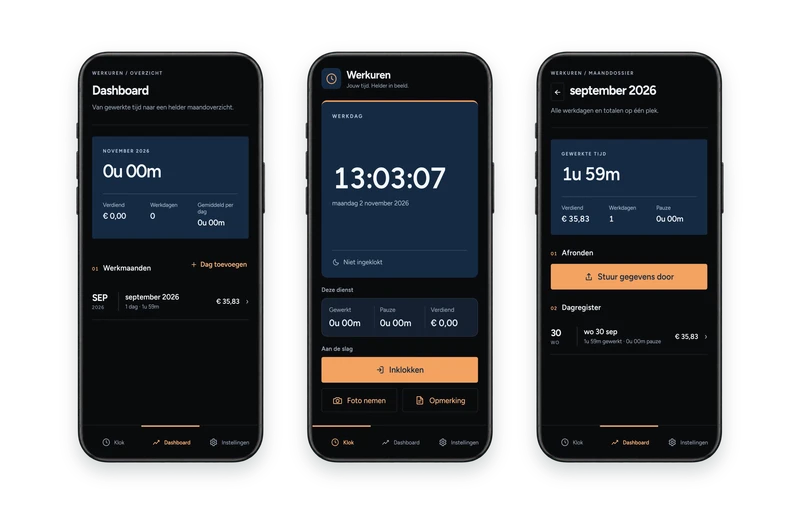
A range of six phones: in the middle the clock screen in the light and the dark theme, on the left the month and the dashboard in light, on the right a day and the Add day window in dark
Technology & use

Under the hood

The key choices behind this app and what they mean in everyday use.

Android and PWA

The same time tracking on Android and in the browser, tailored to work at the riding school.

Own name and branding

Aequilibrium’s logo and colours make the application familiar to employees.

Works without internet

Record hours and breaks in locations with poor reception.

Hours and photos on the device

Records and attachments are stored locally on the employee’s own device.

Monthly PDF report

Create a report with the riding school’s branding and share it with the manager.

One backup file

Save hours, settings and photos in a backup file that can be restored later.

Explore the screens

Explore the application screens in their device mockups, with an explanation of each function.

Explore the screens
For your organisation

Does your team track hours, trips or site work?

Explore which records your employees need and how an app can fit your workflow.

Discuss your app idea
Next projectWerkurenTime tracking app